

How to Start a Faceless YouTube Channel in 2026

The camera was sitting on my desk for six weeks before I admitted I wasn’t going to use it.
Not because I didn’t want to make YouTube videos, I genuinely did. But every time I thought about sitting in front of a lens, scripting something, getting the lighting right, and then watching myself back on screen, something in me just didn’t want to do it. I kept postponing. The camera kept sitting there.
A friend who runs a YouTube channel about personal finance eventually got frustrated with my excuses. “Just don’t show your face,” he said. “Half the biggest channels on YouTube don’t.”
I didn’t believe him until I looked it up. And then I couldn’t stop finding example channels with hundreds of thousands of subscribers built entirely on screen recordings, animation, stock footage, and voiceovers. No face. No personal camera. No sitting under ring lights rehearsing expressions.
That conversation was the thing that actually got me started. This guide is what I wish I’d had before I started the realistic, step-by-step version that skips the fluff and gets into what actually matters.
What a Faceless YouTube Channel Actually Is
A faceless YouTube channel is exactly what it sounds like: a channel that publishes video content without ever showing the creator’s face on screen.
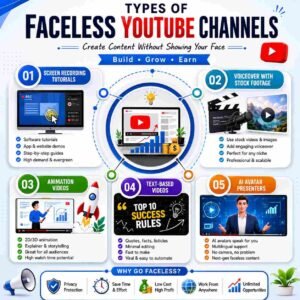
The content itself can take many forms:
Screen recordings: Tutorial videos, software walkthroughs, online course content, productivity tool demonstrations. If you’re teaching someone how to use Canva, Notion, Excel, or any digital tool, your screen is the visual,l and your voice is the guide.
Voiceover with stock footage or images: Educational channels, documentary-style content, news commentary, motivational or self-improvement videos. A compelling voiceover paired with relevant visuals can be just as engaging as face-camera content,nt sometimes more, because the visuals directly support the information being shared.
Animation and motion graphics: Explainer videos, whiteboard-style animations, illustrated storytelling. Tools like Pictory, Animaker, and even Canva’s video features make basic animation accessible without technical expertise.
Text-based or slideshow videos: Information delivered through on-screen text, designed slides, or a combination of text and images with background music or narration. Common in finance, history, and motivational niches.
AI avatar or virtual presenter: A growing category in 2026 where AI-generated presenters (tools like HeyGen or Synthesia) deliver the script without requiring a human to appear on screen. These work particularly well for channels that need a consistent visual presenter but where the creator prefers not to appear personally.
What all of these approaches share is that the creator’s creative and editorial contribution to the script, the structure, the topic selection, and the research is fully present. Only their physical appearance is absent.
Why Faceless Channels Work: The Logic Behind the Model
YouTube’s algorithm ranks videos based on watch time, click-through rate, engagement, and overall viewer satisfaction. None of these metrics requires a human face to be high.
What keeps viewers watching is relevant, well-structured content that delivers on the promise of the title and thumbnail. A viewer who clicked on “how to budget on a student income” wants clear, useful information,n and whether that arrives through a face-cam presenter or a clear voiceover over relevant visuals makes surprisingly little difference to watch time, as long as the content itself is good.
Several faceless niches consistently outperform face-camera content in specific categories:
Finance and investing: Viewers trust information over personality. An anonymously presented, well-researched video on index fund investing often gets higher engagement than a face-camera video on the same topic with weaker content.
History and documentary: The subject matter is inherently visual through historical imagery and footage a presenter’s face would actually distract from the content.
Meditation, sleep, and relaxation: Ambient audio, soothing visuals, calming narration. No face required,d often specifically unwanted.
Software tutorials: The screen is the video. The voice explains what’s happening. A face in the corner would use screen space without adding value.
AI and automation explainers: A rapidly growing category where the information is the draw, not the presenter’s personal brand.
The faceless channel model also opens YouTube to creators who live in cultures or communities where being publicly visible online carries social or professional risk, a real consideration for many creators in Pakistan and across South Asia and the Middle East.
Step-by-Step: How to Start a Faceless YouTube Channel in 2026
Step 1 — Choose a Niche That Works Without a Face
Not every niche translates equally well to faceless content. The key question is: does this topic benefit from a personal, relatable presenter, or does it primarily benefit from clear, useful information?
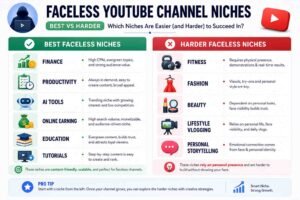
Niches that work exceptionally well without a face:
- Personal finance, budgeting, investing
- Online earning, freelancing, passive income
- Productivity tools and digital organisation (Notion, Canva, Excel)
- History, geography, science explainers
- Language learning tips
- Meditation, motivation, mental clarity
- AI tools and automation
- Software tutorials (any specific tool or platform)
Niches that are harder to build as faceless channels:
- Lifestyle and vlogging (inherently personal)
- Fitness and workout routines (demonstration benefits from seeing a person)
- Fashion and beauty (try-on, application demonstrations)
- Personal storytelling and memoir content
Pick a niche that aligns with something you genuinely know, can research thoroughly, and can sustain long enough to produce at least 30 to 50 videos over the first year.
Step 2 — Decide on Your Video Format Before You Start
Your format choice determines which tools you’ll need and how your production workflow will look. Deciding this early prevents constantly switching approaches and starting over.
Screen recording channels need: a screen recording tool (OBS Studio for free, Loom for simple setups), a decent microphone, and editing software.
Stock footage + voiceover channels need: a stock footage library (Pexels and Pixabay are free; Storyblocks has a good, affordable subscription), a voiceover (your own voice or a text-to-speech AI tool), and editing software.
Animation channels need: an animation tool (Animaker, Vyond, Canva video, or Adobe Express for simpler styles) and a voiceover.
AI avatar channels need: an AI avatar platform (HeyGen and Synthesia are the main options in 2026) and a written script.
For most beginners, the screen recording + voiceover format is the lowest-friction starting point if you’re in a tutorial or education niche. The stock footage + voiceover format works best for informational or explainer niches.
Step 3 — Set Up Your Core Toolkit (Free to Low Cost)
You don’t need expensive equipment to start a faceless channel. Here’s what actually matters:
Microphone: Audio quality matters more than video quality on YouTube. Poor visuals are forgiven. Poor audio causes viewers to click away. A simple USB plug-in microphone,e even a Rs. 2,000–3,000 option from a local store, re is a significant improvement over a built-in laptop microphone. The Fifine K669 or any basic condenser USB mic is sufficient for a beginner channel.
Recording/editing software:
- DaVinci Resolve: Free, professional-grade video editor. Steeper learning curve, but no cost and no watermark. Worth learning properly.
- CapCut Desktop: Free, simpler, excellent for beginners. Has a watermark in some export modes; check the current version options.
- OBS Studio: Free screen recording and streaming tool. Standard choice for tutorial channels.
Thumbnail design:
- Canva: Free tier is genuinely sufficient. Create a thumbnail template you can modify for each video in fifteen minutes consistent thumbnail design is one of the most important factors in channel recognition.
Script and research:
- Google Docs: For scripts. Keep them organised by video.
- AnswerThePublic or Google’s autocomplete: For topic and keyword research. Type your niche topic into YouTube’s search bar and look at the autocomplete suggestions. These are real searches people are making.
Voiceover (if not using your own voice):
- ElevenLabs: The current best AI voice generation tool for natural-sounding narration. Has a free tier with usage limits. Paid plans are affordable for consistent use.
- Your own voice with a basic mic: Always better than AI voiceover for engagement and authenticity, even imperfect. A slightly accented natural voice consistently outperforms a smooth AI voice in most niches because it feels more human.
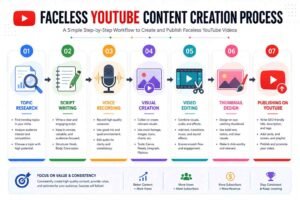
Step 4 — Research and Script Your First Three Videos Properly
Don’t wing the scripts. The difference between a well-scripted video and an improvised one is immediately audible, and it affects watch time significantly.
A good video script structure:
Hook (first 30 seconds): State the specific problem or question your video answers. Don’t introduce yourself first;t the viewer wants to know if this video is for them before they care who made it. “In this video, I’ll show you exactly how to set up a Notion budget tracker from scratch, no templates, just what actually works” is a hook. “Hi everyone, welcome back to my channel” is not.
Content (middle section): Deliver the information clearly, in logical sequence. Use simple language. Every thirty to sixty seconds, briefly preview what’s coming next,t “and in a moment I’ll show you the one feature most people miss.” This keeps viewers from leaving because they know something valuable is still ahead.
Call to action (final thirty seconds): Ask for one specific thing,g subscribe if the video was useful, watch another specific video you link to, or download something you’ve offered. Don’t ask for five things. One clear request works far better.
Step 5 — Create Your First Video With Realistic Quality Standards
Beginners consistently either wait until everything is perfect (and never start) or rush their first video with poor quality and wonder why it performs badly.
A realistic quality standard for your first video:
- The script is fully written and practised aloud at least twice before recording
- Audio has no obvious background noise or echo (record in a small carpeted room if possible, bathrooms and large empty rooms cause echo)
- Visuals are clear and relevant, with no random stock footage that doesn’t connect to what’s being said
- Thumbnail is clean, readable at a small size, and reflects the video’s actual content
- The title includes the keyword someone would actually search to find this topic
That’s it. That’s a publishable first video. Don’t let imperfect colour grading or slightly stiff delivery stop you from publishing. Those things improve with practice, but only if you actually start.
Step 6 — Optimise for YouTube Search from Day One
YouTube is the world’s second-largest search engine. For a faceless channel that isn’t relying on a personal brand to attract viewers, search optimisation is the primary traffic source, especially in the early months before your channel has any algorithmic momentum.
Key optimisation habits:
Title: Include the exact phrase someone would type to find this video. “How to create a Notion budget tracker for beginners 2026” is more searchable than “My favourite budgeting system.” Use your keyword naturally near the beginning of the title.
Description: Write at least 150–200 words for each video’s description. Include the main keyword in the first two sentences. Add related keywords naturally throughout. Include timestamps for longer videos.s YouTube’s algorithm rewards timestamps because they improve viewer experience.
Tags: Less important than they used to be, but still worth filling. Use ten to fifteen tags, mixing your exact topic, broader related topics, and specific variations someone might search.
Chapters: Break videos longer than five minutes into labelled chapters using timestamps. This improves search visibility and helps viewers navigate to the part they need, which improves watch time.
Thumbnail: High-contrast, readable text, relevant image. Test different thumbnail styles in the first ten videos and check YouTube Studio analytics to see which ones get the highest click-through rates.
Real Examples: Faceless Channels That Actually Work
The Notion tutorial channel: A productivity enthusiast starts a YouTube channel dedicated entirely to Notion tutorials, on how to set up databases, productivity systems, study planners, and project management templates. Every video is a screen recording with a voiceover. No face, ever. Within fourteen months of consistent posting (two videos per week), the channel reached 28,000 subscribers and qualified for YouTube Partner Programme monetisation. Ad revenue supplemented by selling Notion templates through Gumroad generates meaningful monthly income.
The personal finance explainer channel: A finance graduate creates a channel explaining personal finance concepts, how compound interest works, what index funds are, and how to build an emergency fund using simple animation made in Canva, combined with a clear, unaccented voiceover. Videos average eight to twelve minutes. The channel grows slowly for four months, then two videos go semi-viral within the algorithm, bringing 15,000 new subscribers in six weeks. Monetised through YouTube ads and a referral link to a budgeting app.
The AI tools reviewer: Someone starts reviewing AI tools, writing assistants, image generators, and productivity apps purely through screen recordings and honest spoken assessment. As interest in AI tools surged through 2024 and 2025, this niche attracted large, engaged audiences. The faceless format was perfectly suited for viewers who wanted to see the tool in action, not the reviewer’s face.
Common Mistakes Beginners Make
Starting with a niche they’re not genuinely interested in because it seemed popular. A channel requires sustained enthusiasm to keep producing content through the slow early months. Choosing a niche purely because it “makes money” without real interest in the subject is the fastest route to abandonment at month three.
Poor audio on the first videos, and wondering why retention is low. Viewers are far more forgiving of imperfect visuals than of imperfect audio. Choppy editing, slightly shaky screen recordings, basic graphics, these are tolerable. A tinny, echoey, or hard-to-understand voiceover causes immediate drop-off. Fix audio before anything else.
Publishing inconsistently and expecting algorithmic momentum. YouTube’s recommendation system rewards channels that publish predictably. Weekly is better than daily for beginners because it’s sustainable. Bi-weekly works if you’re managing a full schedule. Two videos in January, silence in February, three in March signal to the algorithm that your channel is unreliable, and it stops recommending you accordingly.
Copying successful channels’ exact content. Watching what works and understanding why is smart. Reproducing someone else’s video almost identically is both ethically problematic and practically ineffective. YouTube can detect near-duplicate content, and your audience will too.
Quitting before month six. YouTube analytics for a new channel in the first three months are almost always discouraging. Almost all channels look like failures at month three. The ones that succeed are the ones still publishing at month six, seven, and eight when the compound effect of accumulated content finally starts showing up in subscriber and view numbers. Overproducing the first video. Spending three weeks perfecting one video before publishing produces one video. Spending one week producing each of three imperfect but genuine videos produces three videos and three times the learning. Progress compounds on volume, not perfection.
Helpful Tips
Build a swipe file of video ideas from day one. Whenever you notice a question being asked repeatedly in a relevant Facebook group, Reddit thread, or comment section, write it down. These questions are real search queries, exactly the topics your channel should cover. A swipe file of fifty ideas prevents the “what do I post next” paralysis that stalls many beginner channels.
Watch your own videos like a viewer. Before publishing, watch each video at 1.5× speed with headphones, pretending you found it through a search. Notice where you’d skip ahead, where you’d lose interest, where the pacing drags. Edit those moments out. This self-review catches issues that feel invisible when you’re in creation mode.
Create a custom end screen and use it on every video. YouTube’s end screen feature (the last 15 to 20 seconds) lets you display another video and a subscribe button. This drives viewers directly into your next video, improving both watch time and subscriber conversion. Set it up once as a template and add it to every video without thinking.
Batch record your voiceovers. Once you have three or four scripts ready, record all the voice-overs in one session. Your voice and delivery warm up as you record the third or fourth recording, which is always noticeably better than the first, even on the same day. Batching also reduces the “getting started” friction that kills daily momentum.
Use YouTube Studio’s analytics to make decisions, not feelings. After your first ten videos, patterns emerge which videos have the highest average view percentage (viewers watching more of those videos), which thumbnails have the highest click-through rate, and which topics generated the most comments. Let those patterns guide what you create next. Opinions about what will work are less reliable than data about what is working.
FAQs
Is it harder to grow a faceless channel than a face-camera channel? Differently hard, not harder. Face-camera channels grow faster once a strong personal brand develops, and viewers subscribe to the person, not just the content. Faceless channels grow more slowly at first but can scale significantly through search and algorithm recommendations once the content library builds. Neither is universally easier.
Do I need to use my own voice, or can I use an AI voiceover? Both work. AI voiceover (ElevenLabs being the current best option) is perfectly functional, and many successful channels use it. Your own voice, even with an accent or imperfections, tends to outperform AI for engagement because it feels more authentic. The difference isn’t dramatic;c content quality matters far more than whether the voice is human or AI.
Will YouTube monetise a faceless channel? Yes, YouTube’s Partner Programme (which enables ad revenue) is available to any channel meeting the eligibility thresholds (1,000 subscribers and 4,000 watch hours, or 10 million Shorts views in 12 months), regardless of whether the channel shows faces or not. Faceless channels are fully eligible.
What’s the minimum equipment I need to start? A computer with screen recording capability, a basic USB microphone, and free editing software (DaVinci Resolve or CapCut). Canva for thumbnails. That’s genuinely the miniviable setup,p and it produces professional-enough quality to build a real channel.
How long until a faceless channel starts earning? Reaching the YouTube Partner Programme threshold takes most new channels six to twelve months of consistent posting. Some reach it in three months; some take eighteen. This is the realistic range. Ad revenue from YouTube is supplemented by other monetisation (affiliate links, digital product sales, sponsorship,s) which can begin before YouTube’s own programme is accessible.
One Final Thought
The camera on my desk eventually got used, but not in the way I originally expected. I used it to film my screen setup for thumbnail images. My face never appeared in a single video.
The channel grew. Slowly, then noticeably. The content was the draw, not anything about me specifically, but the clarity and usefulness of what each video taught.
That’s the whole promise of a faceless YouTube channel. You don’t need to be comfortable on camera, have a particular accent, live somewhere photogenic, or build a personal brand. You need to know something worth knowing, have the patience to explain it clearly, and show up consistently long enough for the platform to understand what your channel is about and start sending you the right viewers.
Those viewers exist. They’re searching for what you know right now. The only question is whether you’ll give them something to find.
Disclaimer: This article is for educational and informational purposes only. YouTube monetisation thresholds, platform policies, and tool features mentioned are subject to change. Results from YouTube channels vary significantly based on niche, consistency, content quality, and individual effort. Nothing here constitutes a guarantee of income.